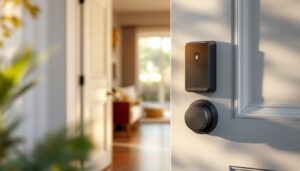
Fumbling for your keys at the door while your hands are full of groceries is a thing of the past. A Vivint smart door lock transforms your entry point into a secure, convenient gateway that responds to your phone, a keypad code, or even your voice. Whether you’re a first-time homeowner exploring smart home upgrades or a DIY enthusiast looking to modernize your security, understanding how a Vivint smart lock works, and whether it’s the right fit for your home, matters. This guide walks you through the features, installation realities, and integration potential so you can make an well-informed choice.
Table of Contents
ToggleKey Takeaways
- A Vivint smart lock replaces your traditional deadbolt to enable remote access via smartphone, keypad codes, or voice commands without requiring structural door modifications.
- The smart lock creates timestamped activity logs for every lock and unlock event, providing a detailed security trail that helps protect your home and simplifies guest access management.
- Installation typically takes 30–45 minutes with basic hand tools if your door has standard bolt-hole spacing; measuring twice and checking compatibility prevents costly installation mistakes.
- A Vivint smart lock integrates with your broader smart home system to automate routines like turning on lights when you unlock the door or triggering security cameras.
- Budget $150–$300 for the lock itself plus potential professional installation costs, and ensure your Wi-Fi network is strong enough to support reliable remote access.
- A Vivint smart lock is ideal for homeowners who value remote access and detailed entry logs, but reconsider if you rent, have a non-standard door, or have unreliable Wi-Fi.
What Is the Vivint Smart Lock?
The Vivint smart lock is a connected door lock that replaces your traditional deadbolt without requiring structural changes to your door. It sits on top of your existing lock mechanism and communicates with a mobile app, keypad, or voice command to lock and unlock your door remotely. Unlike a basic deadbolt, it logs entry activity, allows temporary access codes for guests or service providers, and integrates with broader home automation systems.
Vivint’s smart locks are designed primarily for homeowners who already use or are considering Vivint’s monitoring or home automation platform, though some models function independently. The lock uses encrypted wireless protocols to transmit signals securely between your door and your phone, eliminating the need for a physical key. Most models operate on battery power, typically 4 AA batteries, with a wired backup option for certain installations. Installation typically takes 30–45 minutes if you’re comfortable with basic hand tools and can remove your existing interior lock assembly.
Key Features and Capabilities
Modern Vivint smart lock models come equipped with several practical conveniences:
Remote Access & Control
You can lock or unlock your door from anywhere using your smartphone, provided you have internet connectivity. This is handy if you realize you forgot to lock the door after leaving or need to grant access to a contractor who’s running late.
Temporary Access Codes
Create PIN codes for guests, housekeepers, or delivery personnel that expire automatically after a set date or number of uses. No need to hand out a spare key or change the lock when someone moves out.
Activity Logs
Every lock and unlock is timestamped and recorded, so you know exactly who entered and when. This feature alone helps many homeowners sleep better, especially when combined with a security camera pointing at the entry.
Battery Backup & Alerts
Low-battery notifications keep you from being locked out. Many models also include a manual keyhole or physical override for emergencies, though this varies by model.
Integration Capabilities
Dependending on your system, a Vivint smart lock can tie into routines that turn on lights, disarm alarm systems, or trigger cameras when doors open. This interplay between devices is where the “smart home” advantage becomes tangible rather than novelty.
Not every Vivint lock has every feature, older models and budget-tier options may lack certain capabilities, so check your specific unit’s documentation before expecting a feature.
Installation and Setup Process
Before you begin, confirm that your door is compatible. Most standard residential doors with a single-cylinder deadbolt work fine, but if your door is less than 1-1/8 inches thick or more than 2-1/4 inches thick, you may need shims or an adapter kit, check Vivint’s compatibility chart first.
What You’ll Need:
- Screwdriver set (Phillips and flathead)
- Drill with bits (if needed for mounting holes)
- Tape measure
- Flashlight
- Vivint’s installation guide (crucial, bookmark it)
The Installation Steps:
-
Remove the old lock’s interior assembly. Turn the inside knob counterclockwise and pull the entire assembly toward you. Most deadbolts have two screws holding the mechanism in place: remove those and set the old hardware aside.
-
Check the bolt hole and escutcheon. Measure the distance from the edge of the door to the bolt hole (typically 2-3/8 or 2-3/4 inches). If this dimension doesn’t match your smart lock, you’ll need a reinforcement plate or a different door prep.
-
Install the internal mechanism. Slide the Vivint smart lock’s interior assembly into the cavity where the old lock was. Some units require a strike plate replacement on the frame side: others don’t. Align and secure with the provided screws, but don’t overtighten, you can strip plastic threads.
-
Connect batteries and test. Most Vivint smart door lock models use 4 AA batteries. Insert them into the battery compartment on the interior side, then test the manual lock button to ensure the deadbolt engages smoothly. The bolt should click and retract without resistance.
-
Pair with the app. Follow Vivint’s app setup wizard. You’ll scan a QR code on the lock or enter a pairing code. Make sure your Wi-Fi network is stable and your phone is on the same network during this step.
If your door’s bolt hole is drilled incorrectly or your frame is damaged, you may need to drill a new hole or call a professional. Door prep mistakes are the most common cause of installation headaches, measure twice, drill once.
Security Benefits for Your Home
A Vivint smart lock offers tangible security upgrades beyond the convenience factor.
Controlled Access Trails
Unlike a traditional lock, where you have no record of who entered or when, a smart lock timestamps every unlock event. If your home is broken into, you have a detailed log to review with police. Guest codes can be revoked instantly if circumstances change, and temporary codes expire automatically, eliminating the worry of a spare key floating around indefinitely.
Faster Emergency Response
If a fire or medical emergency occurs while you’re away, you can remotely unlock the door for first responders without smashing it. This can save precious minutes and prevent thousands in door damage.
Deterrent Effect
Visible smart locks, especially paired with a doorbell camera, signal that the home has modern security. Studies show that homes with visible alarm systems and cameras experience fewer break-in attempts. While a smart lock alone isn’t foolproof, it’s part of a layered defense strategy.
Integration with Monitoring Systems
If you subscribe to Vivint’s professional monitoring service, the smart lock ties into your security system. Your monitoring center can be alerted if the door is unlocked unexpectedly, and you can grant emergency access from the monitoring dashboard.
That said, no smart lock replaces good habits: don’t share access codes carelessly, use strong passwords for your app account, and keep your firmware updated. A hacked app login is worse than a lost physical key.
Connectivity and Smart Home Integration
The real power of a Vivint smart lock emerges when it talks to other devices in your home. According to recent smart home technology guides, integration between locks, lights, cameras, and thermostats creates a seamless security and convenience ecosystem.
Wi-Fi and Network Requirements
Your smart lock needs either a 2.4 GHz Wi-Fi connection or a hub device to relay commands. If your Wi-Fi is weak near your entry door, common in older homes or those with thick exterior walls, consider adding a Wi-Fi extender or mesh system. A lock that can’t reach your network is a brick that happens to have a battery.
Automation Routines
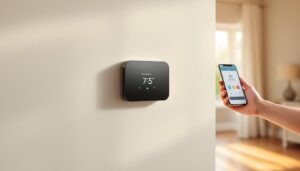
Set up automations so that when the front door unlocks, your entryway lights turn on automatically. Or have the lock trigger your security camera to start recording. Some systems allow you to create “arrival” routines that disarm your alarm and adjust the thermostat when you unlock the door. These conveniences save mental load over time.
Voice Control Compatibility
If your Vivint system supports Amazon Alexa or Google Home integration, you can ask your voice assistant to lock the door, though most smart lock makers require a separate hub device for voice commands rather than direct integration. Check your specific model’s compatibility before assuming voice control works.
Backup Power and Redundancy
Even if your internet goes down, the lock’s local battery power keeps it functional. You can still use a mechanical keyhole or manual override. But, remote app access won’t work without internet, so always have a backup entry method (spare key with a trusted neighbor, or a keypad code you’ve memorized).
Is the Vivint Smart Lock Right for You?
A Vivint smart lock makes sense if:
- You have a door that’s compatible (standard deadbolt, proper bolt-hole spacing).
- You value remote access and detailed entry logs more than you value simplicity.
- You’re building a broader smart home system and want your lock to integrate seamlessly.
- You or household members struggle with keys, lose them regularly, or live with frequent guest traffic.
- Your home already has reliable Wi-Fi coverage at or near your entry.
It’s worth reconsidering if:
- You rent and can’t modify the lock without landlord approval.
- Your door’s bolt hole is non-standard or damaged.
- You prefer zero connectivity and zero battery dependence (a mechanical deadbolt will always work).
- Your Wi-Fi is spotty and you can’t realistically improve it.
- You’re uncomfortable with app-based access or see it as a security liability rather than a benefit.
Comparable alternatives exist: traditional keypad deadbolts (no app, no internet) offer similar convenience without smart features, and they’re often cheaper. Product reviews from major tech sites can help you compare models and read real-world user feedback.
Budget-wise, expect to pay $150–$300 for a Vivint smart lock itself, plus potential installation costs if you hire someone ($100–$200). It’s not a trivial expense, but spread over 5–10 years of ownership, it’s a modest investment in daily convenience and peace of mind. Before committing, watch installation videos, read user reviews on your specific model, and verify that your door setup will work, these checks take an hour and save headaches later.