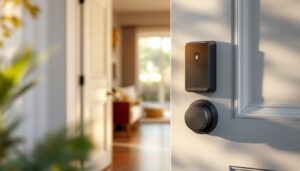
If you’re thinking about a smart lock, you’re not alone, homeowners are ditching traditional keys faster than ever. A smart lock replaces your deadbolt with a connected device that lets you unlock via smartphone, keypad, voice command, or biometric access. Beyond convenience, a smart lock adds a tangible layer of security: you can check who’s at your door from anywhere, grant temporary access to guests or contractors, and receive alerts when someone enters. The best smart locks work with your existing deadbolt hole and integrate seamlessly into your home’s ecosystem. Before dropping money on one, though, you need to understand what actually matters, connectivity type, installation complexity, and compatibility with your smart home setup.
Table of Contents
ToggleKey Takeaways
- The best smart lock combines reliability with features you’ll actually use, such as remote unlock capability, keypad entry, or biometric access that match your specific lifestyle needs.
- Smart locks range from $150–300 for basic models to $500+ for premium options; prioritize a quality locking mechanism and verify battery life of 6–12 months with low-battery alerts to prevent surprise lockouts.
- Connectivity matters: Bluetooth works within 30–50 feet for smartphone access, while Wi-Fi or Zigbee enables remote control but consumes more battery—consider a secondary hub if you need extended range.
- Before purchasing, measure your door thickness (1 3/8″ to 2 1/4″), check your deadbolt’s backset (usually 2 3/8″ or 2 3/4″), and verify compatibility with your smart home ecosystem (Apple HomeKit, Google Home, or Amazon Alexa).
- DIY installation typically takes 30–60 minutes with basic tools, but ensure proper Wi-Fi coverage at your door and check warranty terms (3–5 years is standard) before committing to a smart lock.
- Avoid the cheapest smart locks as they often cut corners on locking mechanisms and app responsiveness; read owner reviews specifically mentioning reliability and app crashes to identify quality options.
What Makes a Smart Lock Worth Installing
A smart lock is only valuable if it solves a real problem in your home. That might be losing keys constantly, managing access for roommates or rental properties, or integrating security into a broader smart home network. Start honest: do you actually need remote unlock capability, or do you mainly want keypad entry so guests don’t need a key?
The best smart locks earn that title because they combine reliability with features you’ll genuinely use. Reliability means the lock functions smoothly, no lag, no random disconnections, no dead batteries at inconvenient moments. Features that matter depend on your situation. If you rent out a unit or manage a vacation property, temporary access codes are gold. If you live alone and rarely travel, a keypad and local smartphone control might be all you need.
Cost factors in here too. A basic deadbolt replacement runs $150–300, while premium models with advanced features can push $500 or higher. Installation costs vary, DIY takes 30–60 minutes if your door prep is clean, but paying a locksmith guarantees it’s done right and doesn’t void the warranty. Budget accordingly and don’t cheap out on the core mechanism itself: a failed lock is worse than no smart lock.
Top Smart Lock Features to Consider Before Buying
Access Methods and Connectivity
Your access method determines daily usability. Keypads are the most straightforward, no batteries needed in your phone, and guests can enter a temporary code. Bluetooth connectivity works great for smartphones as long as you’re within 30–50 feet of the lock: no Wi-Fi needed. But, Bluetooth won’t let you unlock from across town.
Wi-Fi-enabled locks send commands over your home network and can be controlled remotely, but they consume more battery. Many premium models use a secondary hub or bridge, a small device that plugs into an outlet and relays commands, extending range and reliability. Biometric locks (fingerprint or facial recognition) add a premium but are genuinely fast if they’re reliable: poor sensors are frustrating.
Connectivity standards matter too. Zigbee and Z-Wave locks work within a smart home hub (like a Samsung SmartThings hub), while Wi-Fi locks connect directly to your router. No single standard is “best”, it depends on whether you already own a hub and which ecosystems you trust. According to recent product reviews from Tom’s Guide, the most reliable locks balance multiple access methods: Bluetooth for normal use, Wi-Fi or Zigbee for remote control, and a physical keypad backup.
Battery life is non-negotiable. Most use AA or AAA batteries and last 6–12 months under normal use. Check the manufacturer’s estimates and read real owner reviews: some locks drain batteries faster than claimed. Low-battery alerts prevent surprise lockouts, verify the lock sends these alerts to your phone.
Best Smart Locks for Different Homeowner Needs
Budget-Friendly Options
If you’re new to smart locks or just want keypad convenience without very costly, entry-level Bluetooth locks ($150–250) deliver solid core features. These typically offer app unlock, a keypad, and Bluetooth connectivity, no Wi-Fi or hub required. They work best if your phone is your primary access method and you don’t need to unlock from a distance.
A good budget option includes basic fingerprint capability on some mid-range models, which adds speed without extra cost. Avoid the absolute cheapest locks: they often cut corners on the actual locking mechanism or app responsiveness. Read owner reviews specifically mentioning reliability and app crashes, those are red flags.
Premium Locks With Advanced Features
If you want the best smart door lock with handle integration, premium models ($400–600) combine multiple access methods, sleek design, and deep smart home integration. These typically offer Bluetooth, Wi-Fi, keypad, and sometimes fingerprint or facial recognition. Some even let you see who’s at your door via a built-in camera.
Premium locks also integrate with more ecosystems, Apple Home, Google Home, Amazon Alexa, and sometimes Z-Wave or Zigbee hubs. This means voice commands, automation routines, and tighter integration with other smart devices. According to coverage from Digital Trends, the latest models in this tier include features like temporary digital keys for guests, detailed access logs, and emergency unlocking if you’re locked out.
A major advantage of premium locks is build quality and longevity. The deadbolt mechanisms are often engineered to last 10+ years of daily use, while budget models might show wear in 3–4 years. If you plan to stay in your home long-term, the investment pays off.
Installation and Compatibility Tips
Most smart locks mount on the interior side of your existing deadbolt, replacing just the lock cylinder and interior hardware, not the whole door. This matters: if your door frame is damaged or your deadbolt is a specialty type, installation gets complicated.
Before buying, measure your door thickness (should be 1 3/8″ to 2 1/4″), check your deadbolt’s backset (the distance from the door edge to the bolt’s center, usually 2 3/8″ or 2 3/4″), and verify your bolt type (standard pin tumbler vs. high-security cylinders). Most smart locks are not compatible with mortise locks or keyless padlocks.
Installation itself is usually DIY-friendly if you’re comfortable with basic screwdrivers and a drill. You’ll remove the interior deadbolt assembly, install the smart lock’s bracket, and attach the outside and inside components, typically 30–45 minutes. Use a headlamp or work light so you can see into the lock cavity: shadows make the job harder.
Compatibility with your smart home ecosystem is just as important. If you use Apple Home, choose a lock with HomeKit certification. Google Home and Amazon Alexa have broader device support but sometimes require a secondary hub. Some locks work through IFTTT integration, which adds flexibility.
Test your Wi-Fi signal at your door before assuming remote unlock will work, dead zones are common near exterior walls. Consider a mesh Wi-Fi system if you need reliable coverage at entry points. Finally, check warranty terms: most reputable locks include 3–5 years of coverage, and some cover battery replacement or accidental damage. Coverage from CNET on smart home products emphasizes that warranty support often matters more than cutting-edge features when things go wrong.
Final Thoughts on Choosing the Right Smart Lock
The best smart lock isn’t the most expensive or feature-packed, it’s the one that fits your lifestyle, budget, and existing setup. Prioritize reliability and access methods you’ll actually use over gimmicky add-ons. Measure your door first, research compatibility with your smart home system, and read recent owner reviews for real-world performance. With those basics handled, you’ll upgrade your home security without frustration or buyer’s remorse.